 Omni VIP
Every top AI. One VIP chat.
Claude, ChatGPT and Gemini in one fast, beautiful app. Sign in once and your keys, models and settings follow you to Windows, any browser and your phone.

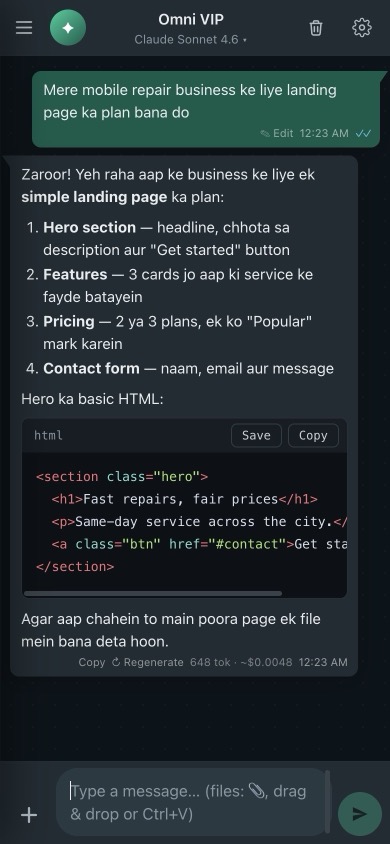
Claude through your MWAPI key, plus ChatGPT and Gemini with your own keys
Everything you need. Nothing you don't.
Built for people who work with AI all day — clean, quick and full of small details that save time.
Claude, ChatGPT and Gemini in one chat
Watch replies appear live. Connect MWAPI, OpenAI and Google in API Connections, then pick any model per chat, then edit, regenerate or continue any answer. Replies in Roman Urdu, English or any language you choose.
Files and images
Send photos, PDFs, Word documents and code. Drag and drop, paste, or use your phone camera.
Image generation
Describe an idea and Claude writes the prompt. Gemini, Cloudflare (free daily quota) or Pollinations draws it.
Live balance and cost
See your key's remaining balance and limits, plus tokens and an estimated cost under every reply.
Save and upload projects
Save AI-written code to a folder in one click, then upload it to your cPanel or VPS over SFTP (Windows app).
Code that's ready to use
Syntax highlighting, one-click copy and save, find in chat, and keyboard shortcuts for everything.
Windows, web and phone
Native Windows app with tray and auto-update, plus an installable web app for Mac, Linux, Android and iPhone.
Up and running in a minute
No configuration files and no long setup. Three steps, once.
Create your account
Sign up with your name, email and a password, in the browser or in the Windows app.
Add your MWAPI key once
Paste your key from api.mwapi.dev. It's encrypted on your device and saved to your account.
Chat anywhere
On a new PC or phone, just sign in. Your key, model and settings are ready instantly.
Your keys stay yours
Accounts use end-to-end encryption. Your password unlocks your keys on your own device, and we never see either of them.
- Zero-knowledge sync. Keys are encrypted with AES-256-GCM before upload. The server only stores data it can't read.
- Password never sent. Only a derived sign-in key reaches the server, and it is stored as a salted scrypt hash.
- Protected on Windows. The desktop app keeps keys in Windows DPAPI storage, away from the chat window.
- Chats stay on your device. Conversations are never uploaded to our servers.
Pick your way to chat
Same account, same features. Version 2.6.1 · released 20 Oct 2026.
Windows Installer
Full desktop app with start menu shortcut and silent automatic updates.
- Auto-update
- Tray and start with Windows
- Save and upload projects
Portable EXE
One file you can run from anywhere, even a USB drive. Update by downloading again.
- No admin rights needed
- Same features as installer
- Great for shared PCs
Web app
Open it in any modern browser. On a phone, add it to your home screen like an app.
- iPhone, Android, Mac, Linux
- Installable (PWA)
- Always the latest version
SHA-256 checksums
Omni-VIP-Setup-2.6.1.exeb8b7a47f99e1919f94d5a2cbbec41c8033f87995b8a7024a1ac3e894a62613f5
Omni-VIP-Portable-2.6.1.exed8cf65fbeaf64219d74547b109b26f79c26d7c6393b94ea4323ddecc591d86bc
Questions, answered
Is the app free?
Yes. The app and the account are free. You only pay for what you use on your own MWAPI API key, which you can get at api.mwapi.dev.
Do I need an account?
No, but it makes life easier. Without an account your key is saved only on that one device. With an account you sign in on any PC, browser or phone and your key and settings are restored automatically.
Can you see my API key?
No. Your key is encrypted on your device with a key derived from your password before it is synced. We store only the encrypted data and a hash of a separate sign-in key, so we can't read or use your API key.
I forgot my password. What now?
Because of the end-to-end encryption, nobody can reset it or recover the synced data. Create a new account and enter your API key once more. Your MWAPI key itself keeps working.
Are my chats synced too?
No. Chats stay on the device where you had them, for privacy. Your API keys, model, reply language and image settings are what sync.
Does it work on iPhone and Android?
Yes. Open the web app in Safari or Chrome and choose "Add to Home Screen" to use it like a normal app, with camera and file uploads.
How do updates work?
The Windows installer checks for updates and installs them for you. The web app updates itself the next time you open it.
Start chatting in under a minute
Create your free account, add your MWAPI key once, and use it everywhere.